ANONYMIZE DATA FOR CHATGPT
Anonymize data for ChatGPT with local PII redaction
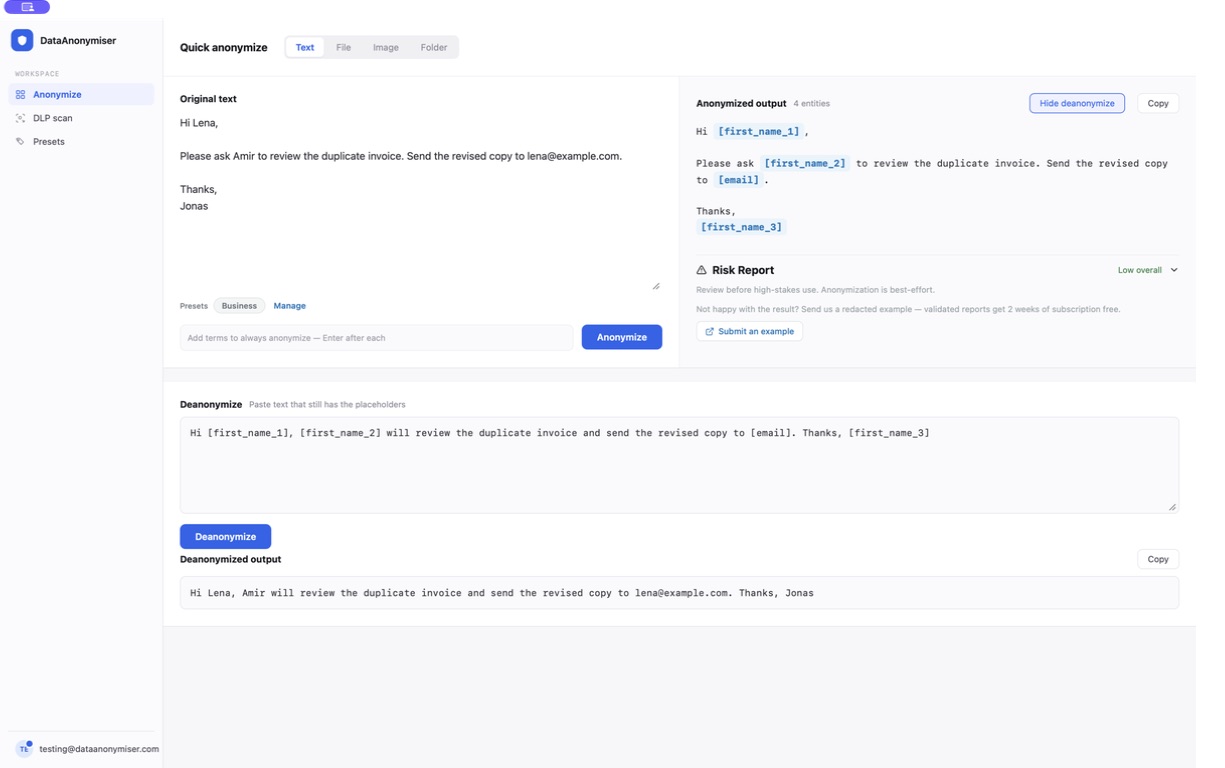
Replace names, email addresses and other personal details in emails, meeting notes and documents on your own device before you paste them into ChatGPT, then put them back in its answer. Placeholders stay consistent, so the AI can still tell people apart, and you review every prompt before it leaves.
Why anonymize data before using ChatGPT?
A real document carries more than the task needs: a signature with a phone number, a transcript naming every participant, a support thread repeating a customer reference. Pasting all of it discloses details that add nothing to the answer.
- The task still works. ChatGPT can explain a delayed delivery or improve a paragraph's tone while the names stay placeholders.
- Redaction and privacy settings do different jobs. Redaction changes what you send; your workspace settings govern what the service does with it. Check both for the account you use.
- Placeholders keep people apart. Each person gets their own numbered placeholder, so the answer still says who does what.

Can you ask ChatGPT to anonymize the original document?
You can, but by then ChatGPT already has the original. An instruction such as “remove all personal information” cannot undo that disclosure, so the first pass has to happen before you upload anything: by hand for a short excerpt, or with a local redaction tool for longer text and repeated values.
How to anonymize data for ChatGPT in five steps
- 1. Choose the smallest useful input. Keep the paragraph or thread the task needs; drop unrelated attachments, signatures and earlier messages.
- 2. Run it through DataAnonymiser. Detection and substitution happen on your device, and detected values become placeholders.
- 3. Review the result. Check the substitutions and any residual-risk warnings, and read the remaining text for details that identify someone indirectly. Add project names or client references as custom terms where your plan includes them.
- 4. Paste it with clear instructions. Tell ChatGPT what to produce and to keep every placeholder unchanged. Never include the mapping between originals and placeholders.
- 5. Restore the answer locally. Bring the response back while the session is still open and the real values return in place of the placeholders. Check facts and placeholder positions before you use it.
Try it on your next prompt
The desktop app finds names, emails and other identifiers on your device and puts them back in ChatGPT's answer.
What should you remove from an AI prompt?
- Direct identifiers. Names, personal email addresses, phone numbers, postal addresses, account references and identity numbers, including repeats in signatures, headers and quoted replies.
- Identifying context. “The only engineer at our island office” identifies a colleague without a name. Generalise details like that by hand.
- Confidential business facts and secrets. Internal prices, unpublished plans, credentials and access tokens. A PII detector cannot decide which business facts are approved for sharing.
Documents, screenshots and the browser extension
- Documents. Work with the text the task needs and check headers, footers, signatures and quoted messages. Anonymising an excerpt does not change the original file.
- Screenshots. The image workflow turns a screenshot into reviewed text; it does not paint over the original pixels. Share the text, not the original image.
- Scans. Compare the recognised text with the source, since poor image quality can miss or misread identifiers.
- The browser extension. It warns when personal data is typed into supported sites and pauses the send button it recognises while the warning shows. For material that must be reviewed first, prepare it in the desktop app.
- Where it runs. The desktop app processes content on your device; Enterprise runs on a server your organisation operates. Neither sends document content to DataAnonymiser.
Frequently asked
Questions about this workflow.
Is it safe to paste customer data into ChatGPT?
It depends on the data, purpose, approved account and applicable obligations. Redaction can reduce unnecessary identifying information, but it does not automatically authorise sharing or guarantee anonymity. Use the workspace approved for the task and review what the complete prompt still reveals.
Can I restore the original text after the AI responds?
You can restore recognised placeholders in the response while the relevant local session mapping remains available. This restores substituted values, not wording the AI has changed or omitted. Keep placeholders unchanged and review the restored answer before using it.
Does this work with tools other than ChatGPT?
Yes. The reviewed output is plain text that can be used with tools such as Claude, Microsoft Copilot and Gemini. Their data-handling rules and capabilities differ, so check the service you plan to use. The local redaction step does not depend on one AI provider.
Is removing names enough to make a prompt anonymous?
No. A distinctive role, location, event or combination of facts can still identify someone. Review the remaining context as well as direct identifiers. Where necessary, remove more detail, prepare a fictional example or use an approved workflow for identifiable information.
Can I upload the original screenshot after anonymizing its text?
The original screenshot still contains its original pixels. DataAnonymiser's image workflow produces text, not a visually redacted replacement image. Share only the reviewed text if that meets the task; uploading the source image would disclose whatever remains visible in it.
Related
Where else this comes up.
PSEUDONYMISATION
A local pseudonymisation tool to replace and restore identifiers
Replace identifiers with consistent placeholders and restore them locally during the working session. Review documents before sharing with AI or another reader.
CUSTOMER SUPPORT
Summarise the ticket. Not the customer.
Strip customer identifiers from tickets and email threads before AI triage, summarisation or drafting.
COMPARE
How this compares to the alternatives
Cloud redaction APIs, browser-only extensions and self-hosted libraries — what each one trades away.
REFERENCE
What is data anonymisation?
How anonymisation, pseudonymisation and masking differ in law, and which one actually takes data outside GDPR.
DataAnonymiser supports redaction and review. Detection can miss identifying information, and redacted text is not automatically legally anonymous. Review outputs and follow the rules applicable to your information and AI service.